
You know your course page. Your guest does not. You know what “beginner course” means at your school, where the group meets and which course option the displayed price refers to. Today, check whether someone outside your school can find those answers on a phone.
Day 3 of the sports school business challenge takes about 20 minutes. You will finish with an observation sheet, a question recorded in the reader’s own words and one specific correction. If a detail needs more time to confirm, record an owner and a review date. The course-offer sentence from Day 2 is a useful starting point; you can also do this test without completing the earlier exercise.
Prepare one real course option
Open the current public page for a specific course option. Record the link, test date and selection, such as level, date and participant count where these affect the displayed price. Check the details against your current course information. Do not copy prices or inclusions from an old screenshot.
Ask someone who did not write the text and does not know the offer by heart to try it on their own phone. They need the page; you need a sheet of paper. Do not explain the page layout or the correct answer first. Say: “Please show me where you find the answer and tell me what you understand from it.”
Ask them to find five answers
- Who is this course for? What prior experience or participation requirements can the person identify?
- What is included? Which activities and equipment are part of the offer, what is optional and what must guests bring?
- How long does it take? How much time should a guest allow in total, and how much of that is teaching or activity time?
- Where does it start? Can the person find the meeting point or a clear explanation of when and how the exact meeting point will be shared?
- What is the total price for the selected option? Can the person connect the price to their selection? If a deposit is shown, can they distinguish it from the total price?
Then ask the person to show where they would begin the next booking step. Today, recording the label and destination is enough. This clarity check does not require a booking or payment.
Record locations before helping
“Somewhere on the page” is not a location. Write, for example, “Inclusions section, second paragraph” or “Price box after selecting two people”. Record the first question in the person’s own words where possible. If they do not ask a question, note that; do not invent one for them.
- Found: The person points to a location and explains the answer clearly.
- Open: The person cannot find an answer or needs your spoken explanation.
- Conflicting: Two locations provide different answers or leave the selected option unclear.
Your explanation does not turn an answer into “found”. Also record cases where someone points to the right text but understands it differently from your school. That gives you a specific observation to work on.
Example: 90 minutes or two hours?
This example is entirely fictional. The top of a course page says “90 minutes”. Further down it says “two hours including preparation”. The reader asks: “Will I be back after 90 minutes, or should I allow two hours?” In the duration row, record both locations, the exact question and the status “conflicting”.
Do not simply choose the number that sounds better. The person responsible for the course must first confirm how much time guests need to allow and what it includes. In this example, they confirm 90 minutes of teaching plus a total of 30 minutes for preparation and finishing up.
Use the observation sheets in the PDF
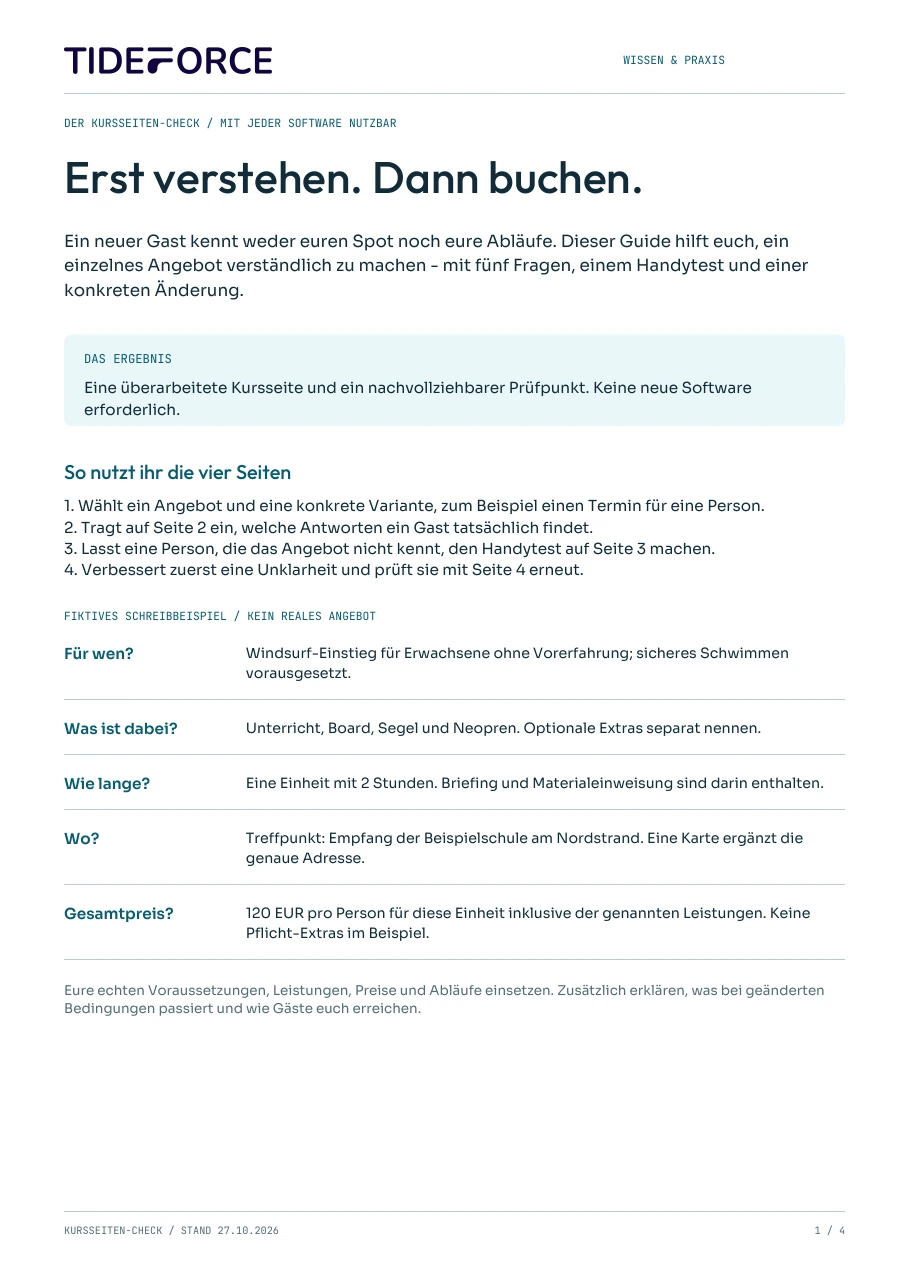
The fillable worksheets are in the four-page PDF “Der Kursseiten-Check”: page 2 collects the five answers and their locations, page 3 records observations from the phone test, and page 4 covers one change and the follow-up check. In the PDF, mark clear answers as “klar”, missing ones as “fehlt” and open or conflicting ones as “unklar”. Request the free guide through the email form. The PDF is in German.
Choose one correction and check it again
First resolve an uncertainty that affects participation or price. Next, address information that exists but is hard to find. Record the exact location, confirmed replacement text and person who can make the change. One extra line beside the course option may be enough for this first attempt; a complete redesign is outside today’s exercise.
Use page 4 of the guide to keep the observed uncertainty, your specific change and the next review date together. The owner needs to know which location to change and which confirmed information to use.
After the change, ask the same person to answer the previously open question again and point to its location. Do not explain the edit first. Record whether they now find the answer and how they understand it. They already know the page: this second pass checks a specific correction, not a new visitor’s first impression. One person also does not make a representative conversion test.
Keep the worksheet and prepare the next step
Request the four-page PDF “Der Kursseiten-Check” through the form on this page. The PDF is in German and contains fillable offer questions, the phone test and a plan for one improvement. Keep the completed guide for your follow-up check.
Today’s exercise is complete when you have recorded all five answers with their locations and status, including open or conflicting details. You must also have checked a specific correction or assigned the necessary factual clarification to an owner with a review date. Day 4 moves on to the booking journey. Keep the label and destination of the next step you found today.
Practical knowledge for every watersports school
The course-page check
Review one offer through a new guest’s eyes: five essential questions, an observed mobile test and a plan for the first improvement.
- Five offer questions with space for your answers
- A mobile test with room for observations
- Choose one change and review it again
PDF · A4 · 4 pages · German
How does this work at your school?
Bring an everyday task from your school. We’ll show you how it could work in TIDEFORCE.
Request a demo →